The Annapurna Yojana 2026 has become one of the most discussed welfare initiatives in West Bengal. The scheme aims to provide financial assistance of ₹3,000 per month to eligible women beneficiaries through the Direct Benefit Transfer (DBT) system. While many applicants prefer to apply online, a significant number of beneficiaries still rely on the offline application process due to limited internet access, lack of digital literacy, or difficulties using online services.
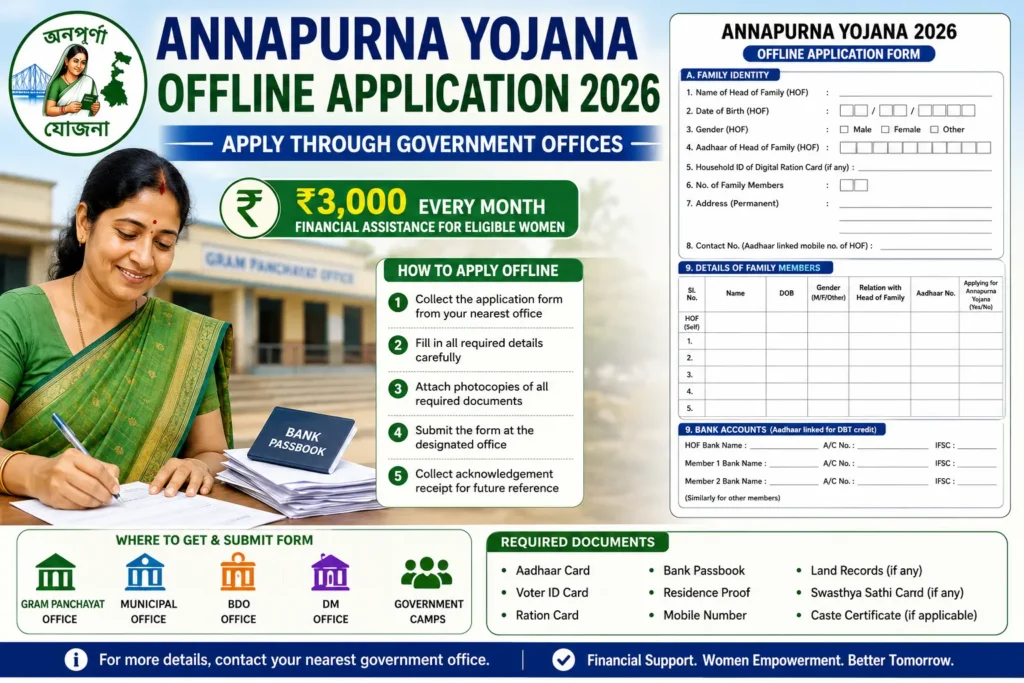
To ensure that every eligible woman can access the scheme, the government has made provisions for offline registration through various local administrative offices and camps. Applicants can obtain assistance from Gram Panchayat Offices, Municipal Offices, Block Development Offices (BDO), District Magistrate (DM) Offices, and special government camps organized from time to time.
This article provides a complete guide on Annapurna Yojana Offline Application 2026, including how to download the application form, where to submit it, documents required, eligibility conditions, verification process, and frequently asked questions.
What is Annapurna Yojana Offline Application?
The Annapurna Yojana Offline Application process allows eligible women to apply for the scheme through designated government offices such as Gram Panchayat Offices, Municipal Offices, BDO Offices, and DM Offices. This option is particularly useful for applicants who do not have access to the internet or are not comfortable with online registration.
অন্নপূর্ণা যোজনার অফলাইন আবেদন প্রক্রিয়ার মাধ্যমে যোগ্য মহিলারা গ্রাম পঞ্চায়েত অফিস, পৌরসভা, বিডিও অফিস এবং জেলা শাসকের কার্যালয়ের মতো নির্ধারিত সরকারি অফিসের মাধ্যমে আবেদন করতে পারেন। যাদের ইন্টারনেট সুবিধা নেই বা অনলাইনে আবেদন করতে অসুবিধা হয়, তাদের জন্য এই পদ্ধতি বিশেষভাবে উপযোগী।
Why Choose Offline Application?
Many beneficiaries prefer the offline application process because it provides direct assistance from government officials. Applicants can receive guidance regarding form filling, document submission, and eligibility verification.
অনেক উপভোক্তা অফলাইন আবেদন পদ্ধতি পছন্দ করেন কারণ এতে সরকারি কর্মীদের কাছ থেকে সরাসরি সহায়তা পাওয়া যায়। আবেদনকারীরা ফর্ম পূরণ, নথি জমা এবং যোগ্যতা যাচাই সংক্রান্ত নির্দেশনা পেতে পারেন।
Limited Internet Access
Not every applicant has access to a smartphone or reliable internet connection.
Lack of Technical Knowledge
Some beneficiaries may not be comfortable filling out online forms.
Assistance from Officials
Offline application centres provide guidance and support during registration.
Easier Document Verification
Officials can immediately verify submitted documents and advise applicants if any document is missing.
Suitable for Rural Areas
Residents of villages and remote locations often find offline registration more convenient.
Who Can Apply Offline?
The offline application process is available to all eligible applicants who satisfy the prescribed conditions.
Generally, applicants should:
- Be a woman.
- Be a resident of West Bengal.
- Possess a valid Aadhaar Card.
- Have an Aadhaar-linked bank account.
- Have a valid mobile number.
- Fulfil government verification requirements.
Applicants who face difficulty applying online can use the offline registration facility.
Annapurna Yojana Form Download 2026
Many applicants search for the Annapurna Yojana Application Form PDF Download option.
If the official application form is made available online, applicants can:
Step 1
Visit the official Annapurna Yojana or Social Registry portal.
Step 2
Navigate to the Downloads or Forms section.
Step 3
Download the latest application form.
Step 4
Print the application form on A4-size paper.
Step 5
Fill the form carefully using blue or black ink.
Step 6
Attach all required supporting documents.
Step 7
Submit the completed application form at the designated office.
Applicants should always use the latest version of the form to avoid rejection.
Where Can You Obtain the Application Form?
Applicants who cannot download the form online can obtain it from:
Gram Panchayat Office
Village residents can collect the application form from their local Gram Panchayat Office.
Municipal Office
Urban residents may obtain forms from Municipal Offices.
BDO Office
Block Development Offices often distribute forms and provide registration assistance.
DM Office
District Magistrate Offices may also facilitate application-related services.
Government Camps
Special registration camps may distribute forms and assist applicants in completing registration.
Documents Required for Offline Application
Applicants should keep all necessary documents ready before visiting the registration centre.
Aadhaar Card
Aadhaar serves as the primary identity document.
Voter ID Card
The Voter ID Card helps establish identity and residence.
Ration Card
The Ration Card may be used to verify family details.
Bank Passbook
A copy of the Aadhaar-linked bank passbook is required for Direct Benefit Transfer.
Mobile Number
Applicants should provide an active mobile number.
Residence Proof
Proof of residence may be required for address verification.
Land Records
Land-related documents may be submitted where applicable.
Swasthya Sathi Card
Applicants possessing a Swasthya Sathi Card may submit a copy.
Caste Certificate
Applicants belonging to reserved categories may provide a valid caste certificate.
How to Fill Annapurna Yojana Offline Application Form?
Many applications are rejected due to mistakes made while filling the form. Therefore, applicants should carefully follow the instructions. Based on the Family Level Data Collection Form for Annapurna Yojana, the application process requires family-level data collection, not just basic beneficiary registration. So, the applicants can follow the steps below –
Step 1: Collect Family Information
Before starting the application, applicants should gather complete information about all family members living in the same household.
The form requires details such as:
- Name of Head of Family (HOF)
- Date of Birth
- Gender
- Aadhaar Number
- Digital Ration Card Household ID
- Family Members’ Details
- Relationship with Head of Family
আবেদন শুরু করার আগে পরিবারের সকল সদস্যের তথ্য সংগ্রহ করতে হবে। পরিবারের প্রধান (Head of Family) এবং পরিবারের অন্যান্য সদস্যদের নাম, জন্মতারিখ, আধার নম্বর ও সম্পর্কের তথ্য দিতে হবে।
Step 2: Provide Aadhaar and Family Details
Applicants must provide Aadhaar details of all family members.
The form specifically asks for:
- Aadhaar Number of Head of Family
- Aadhaar Number of each family member
- Relationship with Head of Family
For children below five years of age, Aadhaar may not be mandatory.
পরিবারের প্রধান এবং পরিবারের অন্যান্য সদস্যদের আধার নম্বর জমা দিতে হবে। পাঁচ বছরের কম বয়সী শিশুদের ক্ষেত্রে আধার না থাকলে তা উল্লেখ করা যেতে পারে।
Step 3: Submit Bank Account Details
The application form requires Aadhaar-linked bank account information of:
- Head of Family
- All Adult Family Members
Applicants must provide:
- Bank Name
- Account Number
- IFSC Code
DBT payments will be credited only to verified bank accounts.
পরিবারের প্রধান এবং সকল প্রাপ্তবয়স্ক সদস্যের আধার-সংযুক্ত ব্যাঙ্ক অ্যাকাউন্টের তথ্য জমা দিতে হবে। ব্যাঙ্কের নাম, অ্যাকাউন্ট নম্বর এবং IFSC কোড উল্লেখ করতে হবে।
Step 4: Provide EPIC and Category Details
Applicants must submit:
- EPIC/Voter ID Details
- Electoral Roll Part Number
- Social Category
Available categories include:
- UR
- UR-EWS
- SC
- ST
- OBC
- PVTG
Relevant caste or EWS certificates may be required.
আবেদনকারীদের ভোটার কার্ড (EPIC) সংক্রান্ত তথ্য এবং জাতিগত শ্রেণির তথ্য দিতে হবে। প্রয়োজন হলে জাতি শংসাপত্র বা EWS শংসাপত্র জমা দিতে হবে।
Step 5: Enter Ration Card Information
The form collects information regarding:
- Digital Ration Card Availability
- Type of Ration Card
- Monthly Ration Collection Status
Accepted categories include:
- AAY
- PHH
- SPHH
- RKSY-I
- RKSY-II
- Non-Subsidized Card
ডিজিটাল রেশন কার্ডের তথ্য এবং রেশন কার্ডের ধরন উল্লেখ করতে হবে। এছাড়াও পরিবার মাসিক রেশন গ্রহণ করে কি না তা জানাতে হবে।
Step 6: Declare Family Assets
Applicants must disclose:
- Number of Pucca Rooms
- Land Ownership
- Size of Land Holdings
- Vehicle Ownership
- Health Insurance Coverage
Vehicle details and land records may be required.
পরিবারের বাড়ি, জমি, যানবাহন এবং স্বাস্থ্যবিমা সংক্রান্ত তথ্য দিতে হবে। প্রয়োজনে জমির নথি ও যানবাহনের রেজিস্ট্রেশন তথ্য জমা দিতে হতে পারে।
Step 7: Provide Income and Employment Information
The form asks for:
- Income Tax Status
- PAN Details
- Employment Type
- Educational Qualifications
- Total Annual Family Income
Employment categories include:
- Government Employee
- Private Sector Employee
- Self Employed
- Farmer
- Labourer
- Unemployed
পরিবারের আয়, পেশা, PAN নম্বর এবং শিক্ষাগত যোগ্যতার তথ্য দিতে হবে। পরিবারের মোট বার্ষিক আয়ও উল্লেখ করতে হবে।
Step 8: Provide Additional Identity Information
The form seeks information regarding:
- CAA Application Status
- Credit Cards such as KCC, Artisan Credit Card, Student Credit Card
- Other Government-Issued Identity Numbers
CAA আবেদন, কৃষক ক্রেডিট কার্ড, স্টুডেন্ট ক্রেডিট কার্ড বা অন্যান্য সরকারি পরিচয়পত্রের তথ্য দিতে হতে পারে।
Step 9: Submit Children and Social Status Details
Applicants must provide:
- School Details of Children
- Vaccination Status
- Educational Information
The form records details of children studying in schools, madrasahs, or other educational institutions.
পরিবারের শিশুদের বিদ্যালয়, শ্রেণি এবং টিকাকরণ সংক্রান্ত তথ্য জমা দিতে হবে।
Step 10: Declare Existing Government Scheme Benefits
Applicants must disclose whether family members already receive benefits through DBT under any government scheme.
The form records:
- Scheme Name
- Beneficiary Details
- Whether the applicant wishes to opt out
পরিবারের সদস্যরা অন্য কোনো সরকারি প্রকল্পের DBT সুবিধা পেয়ে থাকলে সেই তথ্য উল্লেখ করতে হবে।
Step 11: Sign Declaration and Submit Form
The applicant must sign the declaration confirming that:
- All information is correct.
- Supporting documents have been provided.
- False information may lead to cancellation of benefits.
The application is then submitted for verification by the designated officer.
আবেদনকারীকে ঘোষণাপত্রে স্বাক্ষর করতে হবে এবং নিশ্চিত করতে হবে যে সমস্ত তথ্য সঠিক। ভুল তথ্য দিলে সুবিধা বাতিল হতে পারে।
How to Submit the Offline Application Form?
After completing the form, follow these steps:
Step 1
Attach all required documents.
Step 2
Verify that the form is complete.
Step 3
Visit the designated registration centre.
Step 4
Submit the application form.
Step 5
Receive an acknowledgement receipt.
Step 6
Keep the receipt safe for future reference.
Importance of Acknowledgement Receipt
The acknowledgement receipt serves as proof of submission.
It may be required for:
- Application Tracking
- Status Verification
- Complaint Resolution
- Future Follow-up
Applicants should never lose the acknowledgement receipt.
What Happens After Form Submission?
After submission, the application enters the verification stage.
Government officials may verify:
- Identity Details
- Aadhaar Information
- Residence Information
- Family Details
- Bank Account Information
- Eligibility Conditions
Only verified applicants are approved for benefits.
How Long Does Verification Take?
Verification timelines may vary depending on:
- Number of Applications
- Verification Requirements
- Administrative Workload
- Document Completeness
Applicants should regularly check for updates.
How to Check Annapurna Yojana Status After Offline Application?
Even if you apply offline, status tracking may be available online.
Step 1
Visit the official portal.
Step 2
Open the Application Status section.
Step 3
Enter required details.
Step 4
Submit the information.
Step 5
View the application status.
Possible status messages include:
- Submitted
- Under Verification
- Approved
- Rejected
- Payment Released
Common Reasons for Rejection
Applicants should avoid the following mistakes:
Incomplete Form
Every section of the form should be completed.
Incorrect Aadhaar Number
Wrong Aadhaar information can lead to rejection.
Wrong Bank Details
Incorrect account numbers may prevent payment processing.
Missing Documents
Failure to attach required documents may result in rejection.
Duplicate Applications
Submitting multiple forms may create verification issues.
Ineligible Applicant
Applicants who fail to meet eligibility conditions may not receive benefits.
Benefits of Offline Registration
Offline registration offers several advantages.
Personal Assistance
Officials can guide applicants during the process.
Reduced Technical Errors
Applicants receive support while filling forms.
Easier Verification
Documents can be checked immediately.
Accessibility
Beneficiaries without internet access can still apply.
Better Support for Rural Applicants
Offline centres help bridge the digital divide.
Tips for Successful Offline Application
To improve approval chances:
- Carry original documents.
- Bring photocopies of all documents.
- Use clear handwriting.
- Verify Aadhaar and bank details.
- Keep a copy of the submitted form.
- Save the acknowledgement receipt.
- Use an active mobile number.
Frequently Asked Questions (FAQs)
Can I apply for Annapurna Yojana offline?
Yes, eligible applicants can apply through designated government offices and camps.
Where can I get the application form?
Forms may be available through Panchayat Offices, Municipal Offices, BDO Offices, DM Offices, and official portals.
Is Aadhaar mandatory?
Yes, Aadhaar is generally required for identity verification and DBT payments.
Do I need a bank account?
Yes, benefits are transferred directly into an Aadhaar-linked bank account.
Can I check my status online after applying offline?
Yes, status tracking may be available through the official portal.
What documents are required?
Aadhaar Card, Voter ID Card, Ration Card, Bank Passbook, Mobile Number, Residence Proof, Caste Certificate (if applicable), and other supporting documents.
How much assistance is provided?
Eligible beneficiaries receive ₹3,000 per month.
What should I do if my application is rejected?
Review the reason for rejection and contact the concerned office for guidance.
Conclusion
The Annapurna Yojana Offline Application Process 2026 provides a convenient alternative for applicants who are unable to register online. By visiting designated government offices, obtaining the application form, submitting the required documents, and completing verification, eligible women can access the benefits offered under the scheme.
Applicants should ensure that all information provided in the form is accurate, documents are complete, and Aadhaar-linked bank account details are correct. Proper submission and timely verification can help beneficiaries receive the ₹3,000 monthly financial assistance without unnecessary delays.